 PARDESCO
Algorithmic Art in 2026: How AI Finally Made It Beginner-Friendly
Algorithmic art is art whose form is decided by a rule rather than by hand. You do not draw the thing; you write the process that draws it, and then you find out what you made. I have worked this way for years, and until recently I would have told a beginner it was a long road. That has genuinely changed, and I think it is the most interesting thing to happen to this medium in a decade.
What algorithmic art actually is
The idea is older than computers. Islamic geometric tiling is algorithmic — a small set of construction rules, applied consistently, producing patterns nobody drew freehand. Sol LeWitt wrote wall drawings as instructions and let other people execute them. In both cases the artwork is the rule; the visible result is one performance of it.
What a computer adds is speed and depth of iteration. A rule that would take a month to execute by hand runs in a second, so you can afford to be wrong. That changes what kind of ideas are worth having.
Algorithmic art is not AI art
These get conflated constantly and they are close to opposites.
AI image generation turns a text prompt into a picture through a process that is opaque even to the person prompting. You get a result; you cannot inspect the reasoning, and running it again gives you something different.
Algorithmic art turns a rule you wrote into an image through a process you can read line by line. Same inputs, same output, every time. If you do not like something you can find the specific line responsible and change it.
I use AI heavily and there is no AI-generated imagery anywhere in my work. Those two facts are compatible, and the next section is why.
The barrier was never ideas — it was the gap before your first good piece
Here is the part I want to say to beginners, because I think it is under-appreciated and genuinely hopeful.
The hard part of algorithmic art was never the ideas. Most people who are drawn to this have plenty. The hard part was the distance between having an idea and seeing it: you needed enough programming to express the rule, enough graphics knowledge to render it, and enough patience to debug for hours before finding out whether the idea was any good at all.
Most people quit in that gap. Not because they lacked taste, but because the feedback loop was measured in weeks, and no aesthetic instinct survives that.
That gap has collapsed. Working with a coding assistant — I use Claude — you can describe the behaviour you want and have something running in minutes. Not perfect, often not even right, but running, which means you can look at it and react. The loop between "what if" and "oh, that's ugly" is now short enough to actually iterate.
How I actually use it
My pipeline is mathematical from end to end. Real four-dimensional polytopes, real projections, real fibrations. AI does not invent that geometry and could not — it comes from the mathematics. What AI does is let one person build the tooling that would otherwise need a team: the generator that bakes a rotation frame by frame, the exporters, the render scripts, and more recently the materials and lighting driven directly into Blender.
I direct; it implements. That division has held up across every project I have used it on, and it is the one I would recommend to anyone starting out. Keep authorship of the rule. Delegate the typing.
A worked example: the Hopf Staircase
The piece at the top of this page is a reasonable illustration of what the process looks like now.
The Hopf fibration is a structure that maps a three-sphere onto an ordinary sphere so that every point of the result corresponds to a circle in the original — and no two of those circles ever intersect, yet every pair is linked. It is one of the genuinely beautiful objects in topology and it is very hard to picture.
The rule for this piece: build a staircase and carry it along those fibres. Each step is placed by the geometry, and each one shrinks by exactly the amount the conformal structure demands — not by an amount I chose because it looked right, but by the amount the mathematics requires. That distinction is the whole discipline in one sentence.
The idea took an afternoon to test. Ten years ago it would have taken me a month, and I probably would not have started — because I would not have known, going in, whether it was worth a month. That is the change: the cost of trying an idea dropped far enough that speculative ideas became affordable.
My current direction: making the code the material
The Hopf piece is a rule producing a form. What I have been chasing since is a step further back: work where the process is the subject, not just the cause.
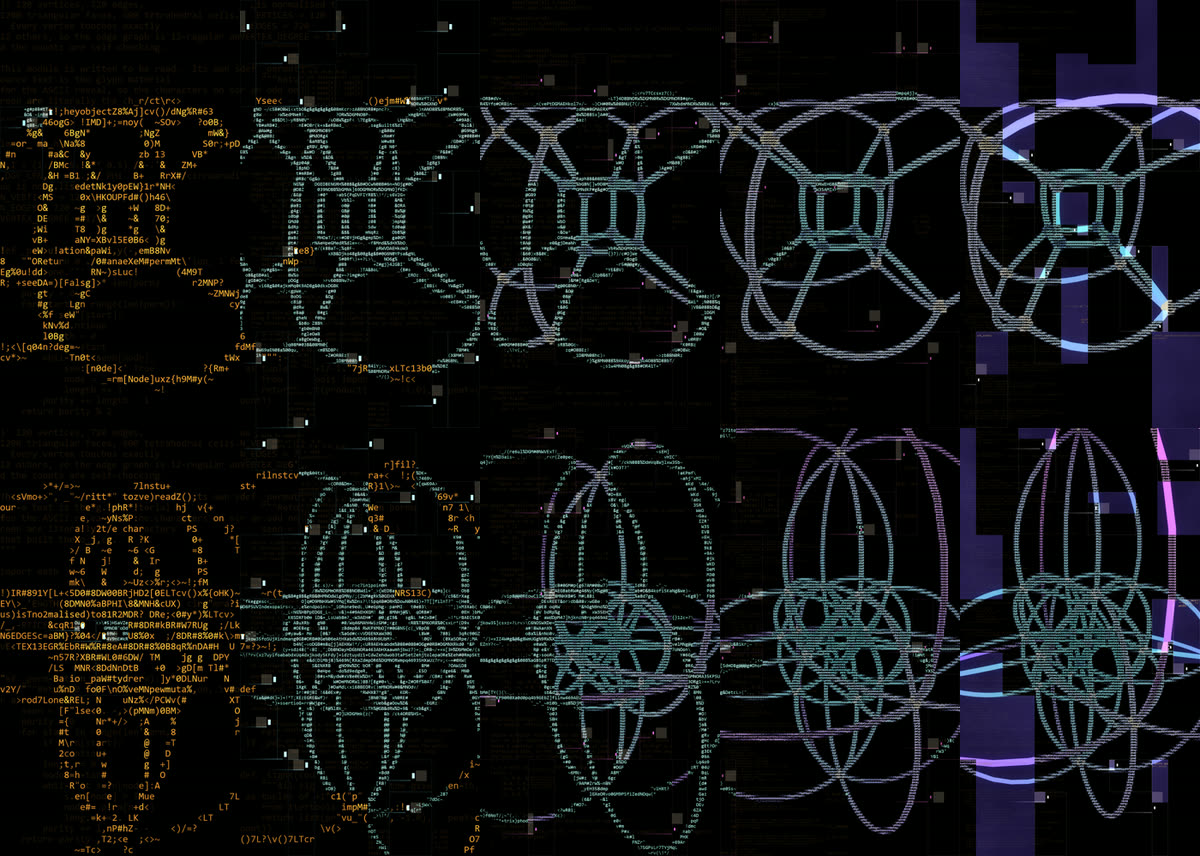
The rule for this one is short to state. Render the polytope. Then throw the render away and rebuild it out of text — sample the brightness of each cell of a character grid, and choose a glyph for it. The glyphs are not decorative and they are not random: they are taken, in order, from the source code of the pipeline that generated the image. The Python that constructs the vertices, applies the four-dimensional rotation, and projects the result into three dimensions is the same text you are looking at. The picture is made of its own instructions.
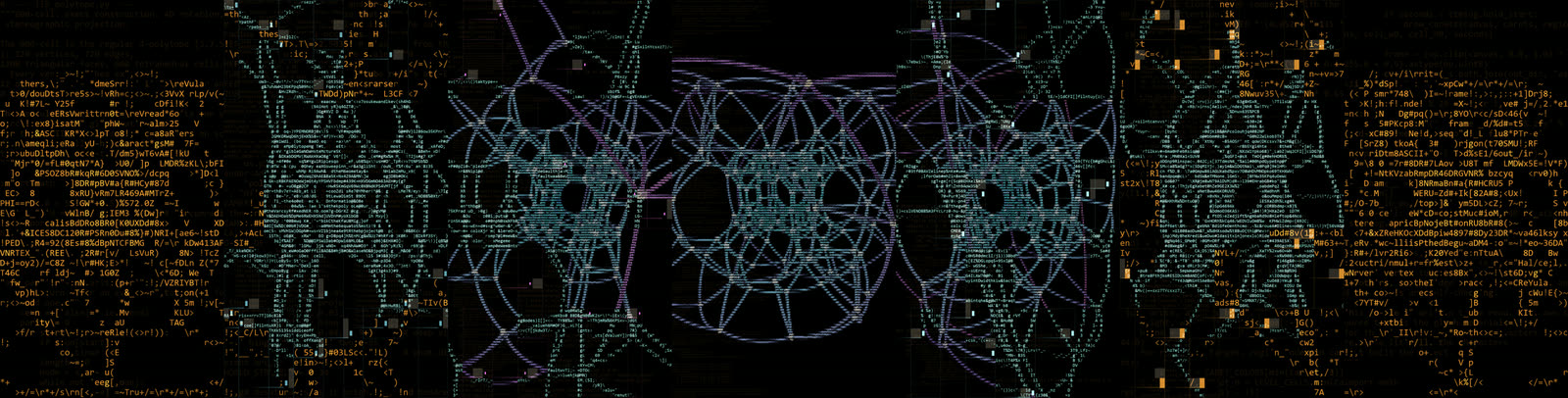
What makes it worth doing rather than just clever is that the two halves fight each other productively. A stereographic projection of a 480-edge polytope is a dense, continuous, curved thing. A character grid is coarse, discrete and rectangular. Forcing one through the other loses information everywhere, and the places where it fails — where an arc breaks into disconnected marks, where the text goes back to being text — are the parts I find most interesting to look at.
Why this belongs in an article about AI
Because it is the same division of labour as everything above, at a larger scale. The geometry is exact and comes from the mathematics. The rule — code as the material, brightness as the selector, the loop closing back into plain text — is mine, and it is the part that decides whether the piece is any good. What AI built is the machinery in between: the character sampler, the scene builder that assembles the arcs, the compositor that turns 150 frames into a seamless loop, the render plumbing that drives it all through Cycles.
That machinery is genuinely a lot of code, and it is the kind of code I would previously have never written — not because it is hard in an interesting way, but because it is a great deal of unglamorous work standing between an idea and knowing whether the idea was any good. That is the whole argument of this article in one project. The concept took an evening to describe. The implementation, alone, would have been months.
How to start this week
Concretely, for someone who has never written a generative sketch.
1. Change something that already runs
Do not start from an empty file. Open something working and perturb it. My 3D fractal viewer is free, runs in a browser, and needs no signup — move a parameter and watch what the geometry does. An hour of that teaches more about the relationship between rule and result than a week of tutorials.
It also exports images and greyscale depth maps, which means what you make there does not have to stay on screen. I use those exports as the source files for CNC-carving fractals into wood.
2. Pick one rule and have it built
Choose a single idea — "circles that repel each other", "a line that turns 137.5° each step", "colour by how long a point takes to escape". Describe it to a coding assistant, get a sketch running, then read the code and change a number. Watch what breaks. Working code you can break is the fastest teacher available, and you now have an unlimited supply of it.
3. Go and look at a lot of it
Taste is the part nobody can build for you, and it comes from looking. The best single place I know is the Bridges Math Art Gallery — years of juried mathematical and algorithmic work, across every medium from paper folding to steel, with artist statements explaining the rule behind each piece. That last part is what makes it more useful than scrolling an image feed: you get to see the reasoning, not just the result.
It is also a real target to work toward. Bridges and the Joint Mathematics Meetings both run juried exhibitions that accept submissions from anyone — I have had pieces in both, and the standard is high but not closed.
4. Follow the accidents
The best results in algorithmic work are usually not the ones you designed. A bug produces something better than the intent surprisingly often. Keep the accidents; that is where the medium's real character lives.
5. Take one piece off the screen
Print it, plot it, cut it, cast it. Something changes when an algorithmic form becomes an object — the mathematics stops being a picture and becomes a fact about a thing in the room. It is also the fastest way to find out whether a design is genuinely good, because a screen forgives a great deal that wood does not.
The skill I built for this
Everything above describes a way of working. I packaged it, so you can start from it instead of rebuilding it.
algorithmic-art is a free, open-source Claude Agent Skill for generative art — MIT licensed, no dependencies, and built to produce work that looks intentional rather than defaulted.
git clone https://github.com/Pardesco/algorithmic-art-skill ~/.claude/skills/algorithmic-artOn Windows that path is %USERPROFILE%\.claude\skills\algorithmic-art. Claude picks it up automatically on generative-art requests, or you can call it directly with /algorithmic-art. It also follows the standard Agent Skills layout, so it works on claude.ai and through the API.
The two decisions that make it work
It has to look at what it made. The core of the skill is a mandatory render → critique → revise loop. A model asked to write generative art and ship it produces something plausible and mediocre; a model required to render the result, look at it, and say what is wrong before delivering produces markedly better work. That single constraint changed my output more than any prompt wording ever did.
It actively fights mode collapse. Left alone, models converge on the same five looks, because that is the average of what exists. The skill carries a catalog of techniques across ten categories — flow fields, growth simulations, tilings, strange attractors and so on — plus a rule requiring two orthogonal techniques be combined. It is a deliberate push away from the default, which is the exact failure I warn about in the next section.
It exports to real media
This is the part I care about most, because screen-only work is a dead end. Everything is deterministic — one seed drives the piece, and an export is a re-render at target resolution rather than an upscale — and it writes out:
- Print-resolution PNG, re-rendered at print size rather than enlarged
- SVG and DXF in millimetres, for pen plotters, laser cutters and CNC
- Video — seamless phase-driven loops via ffmpeg, and audio-reactive pipelines
- Blender escalation when a piece outgrows the canvas
The 2D engine is vanilla JavaScript with no CDN dependency, so it runs offline and does not break under a strict content-security policy. ffmpeg, Playwright and Blender are optional accelerators, not requirements.
It is deliberately different from Anthropic's official skill of the same name — that one opens with a written philosophy statement and ships without looking at the render. This one starts with three sentences of intent and then makes you look. Both are reasonable; I wanted the feedback loop.
What I would tell you honestly
Two cautions, because the optimism above is real but not unconditional.
Understanding still matters. You can now produce work you do not understand, and it shows. The people who get furthest are the ones who know roughly what their rule is doing, because that is what makes the next change deliberate rather than random. You do not need a mathematics degree — you do need to read the code you are given.
The tool will happily make you generic. Ask for "generative art" and you will get the same handful of looks everyone else is getting, because that is the average of what exists. This is the failure the skill above is built to resist, and even then it only gets you off the default — it cannot tell you what to say instead. The interesting work comes from bringing something specific to the collaboration: a piece of mathematics you care about, a material constraint, a question nobody else is asking. The assistant is very good at execution and has no opinions worth borrowing.
That second point is, I think, the whole game. When implementation is cheap, taste and specificity are the entire remaining differentiator — which is good news if you have something to say, and no help at all if you don't.

More from this practice
- What is 4D art? — the four-dimensional side of the work, and the pipeline behind it
- Fractal wall art on a CNC — taking algorithmic designs off the screen and into aspen
- The geometry of the infinite — hyperbolic structures in art history
Studio dispatches
New work, new writing — straight to you
Occasional letters from the studio. No spam, unsubscribe anytime.