 PARDESCO
Retro & pixel rendering
Ordered Dithering: Bayer, Blue Noise, and IGN
Ordered dithering turns a handful of colors into the illusion of many, using nothing but a fixed grid of thresholds. Here's how Bayer, blue noise, and IGN differ — and a live demo to see it.
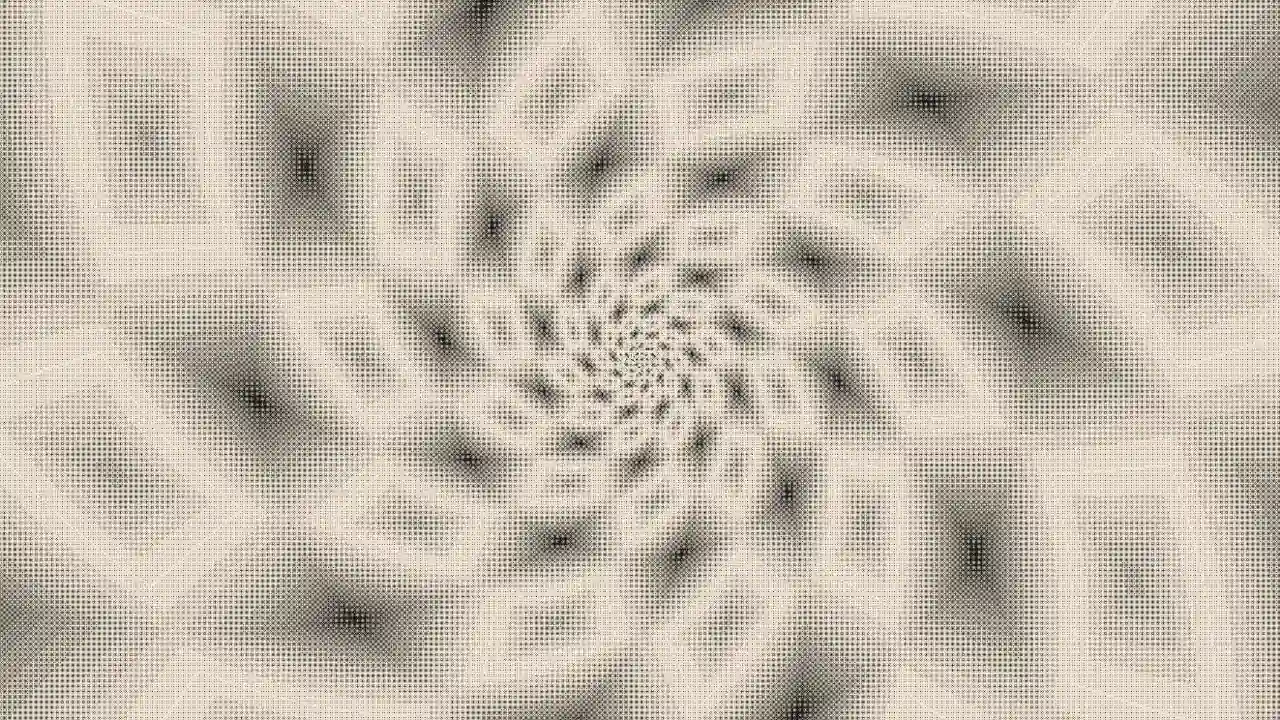
You have two inks — black and white — and you want to show a smooth gradient from dark to light. You can't mix a gray. So you cheat: you scatter black and white dots in just the right proportion, and from a step back your eye blends them into gray. That's dithering, and it's how newspapers, Game Boys, and early Mac screens showed rich imagery with almost no colors.
Ordered dithering is the fast, deterministic way to do it. Instead of computing where dots should go pixel-by-pixel, you compare every pixel to a fixed grid of thresholds — a mask — that you tile across the whole image. It's cheap enough to run on every frame in real time, which is exactly why the studio uses it. This article compares the three masks it offers — Bayer, blue noise, and IGN — and you can flip between them live.
◆ Open in StudioOpen the demo — Bayer 4×4A two-ink spiral, dithered with the classic 4×4 Bayer mask. Zoom in to see the grid.The core idea: one threshold per pixel
Here's the whole algorithm in one sentence: for each pixel, look up a threshold from the mask at that position; if the pixel is brighter than the threshold, draw it light, otherwise draw it dark.
Because the mask is a small tile (say 4×4) repeated across the image, a solid mid-gray region turns into a regular pattern of light and dark pixels — roughly half and half, so it reads as gray. A brighter region trips more thresholds and lands mostly light; a darker region trips fewer and lands mostly dark. The mask never changes between pixels of the same value, which is what makes ordered dithering stable and grid-like rather than noisy and shimmering.
Everything below is the same scene and the same two inks. Only the mask changes.
Bayer: the structured classic
The Bayer matrix is the mask everyone recognizes. It's built recursively — a 2×2 tile becomes a 4×4, which becomes an 8×8 — with the thresholds arranged so that any two neighbors are as far apart in value as possible. That maximizes the spread of dots and gives Bayer its signature woven, cross-hatched texture.
The size of the matrix sets how many shades you can fake. A 2×2 mask gives only 4 distinct threshold levels — coarse, obviously patterned, very "computer from 1984":
◆ Open in StudioTry the Bayer 2×2 maskThe coarsest ordered mask — only four threshold levels, very visible cross-hatch.An 8×8 mask gives 64 levels — much smoother gradients, but the ordered grid is larger and more visible as a texture:
◆ Open in StudioTry the Bayer 8×8 mask64 threshold levels — smoother gradients, but the woven grid texture is stronger.There's a trade-off baked in: bigger Bayer matrix means smoother tone but a more prominent grid. That grid is either a feature (retro charm) or a bug (distracting structure), depending on what you're making.
Blue noise: the grid disappears
Blue noise throws out the regular grid entirely. Its thresholds are random — but not white-noise random. Blue noise is randomized so that similar values are spread as far apart as possible, with energy concentrated in high frequencies (hence "blue," by analogy with light). The result: no repeating pattern, no low-frequency clumps, just an even, fine stipple that the eye reads as film grain.
◆ Open in StudioSwitch to blue noiseNo grid. Randomized-but-even thresholds read as organic film grain.Compare it back-to-back with Bayer and the difference is immediate — the woven cross-hatch is gone, and gradients look organic instead of mechanical. Blue noise is the go-to when you want the benefit of dithering (no banding) without announcing that dithering is happening.
IGN: the one-liner that punches above its weight
Interleaved gradient noise is a tiny formula — a single line of shader math popularized for real-time rendering. It isn't quite as perfectly distributed as a precomputed blue-noise texture, but it's astonishingly good for how little it costs, and it holds up under motion, which matters when you're animating.
◆ Open in StudioSwitch to IGN (interleaved gradient noise)The one-line GPU favorite — cheap, tight, and animation-friendly.If you're dithering thousands of frames on the GPU — like exporting a loop — IGN is often the sweet spot: nearly blue-noise quality, effectively free.
The "living dither" trick
Here's something the demo does that a static image can't: it animates the mask
itself. Because an ordered mask tiles the image, sliding it by whole tiles per
loop leaves the pattern seamless — but along the way the stipple crawls, giving
the flat two-ink surface a subtle shimmer of life. In the studio that's the
ditherShift track; the trick is to shift by enough whole steps that the texture
visibly moves rather than ticking once per loop.
That "how do I make it loop cleanly" question is really about integer-cycle math, and it applies to every animated parameter, not just dither — a topic worth its own article in this cluster.
Choosing a mask, quickly
- Want a retro, unmistakably-digital look? Bayer — pick the matrix size for how coarse you want the grid.
- Want clean gradients with no visible structure? Blue noise.
- Animating, or rendering lots of frames? IGN.
Ordered dithering pairs naturally with a limited palette — but you don't have to give up your colors to use it. The studio can quantize a scene's own gradient instead of snapping to a fixed palette, which is a different and underused idea: Pixel-Art Filters Without Palette Lock-In. And if you arrived here from the tilings side, the same finish pass is what gives Penrose tilings their printed, two-ink look.
Everything above is live and free — open any demo, switch masks, and export a seamless loop. More in the Learn hub.
Frequently asked
What is ordered dithering?
Ordered dithering approximates shades and colors you cannot display by comparing each pixel to a fixed grid of threshold values called a mask. Where the pixel's brightness beats its threshold it snaps to the lighter color, otherwise the darker one. The mask is the same for every frame, which makes it fast and stable.
What is a Bayer matrix?
A Bayer matrix is the classic ordered-dither mask: a recursively built grid of thresholds (2×2, 4×4, 8×8, …) arranged so that neighboring thresholds are as different as possible. It produces the characteristic cross-hatched retro look.
Is blue noise better than Bayer dithering?
It depends on the goal. Bayer is structured and gives a deliberately retro grid. Blue noise has no visible grid — its thresholds are randomized but spread evenly, so it reads as smooth film grain and hides banding better. For a clean modern look choose blue noise; for a vintage look choose Bayer.
What is interleaved gradient noise (IGN)?
IGN is a single-line noise function popular in real-time graphics. It is nearly as clean as blue noise but costs almost nothing to compute and behaves well under animation, which is why it is common in games and GPU shaders.
Studio dispatches
New work, new writing — straight to you
Occasional letters from the studio. No spam, unsubscribe anytime.