 PARDESCO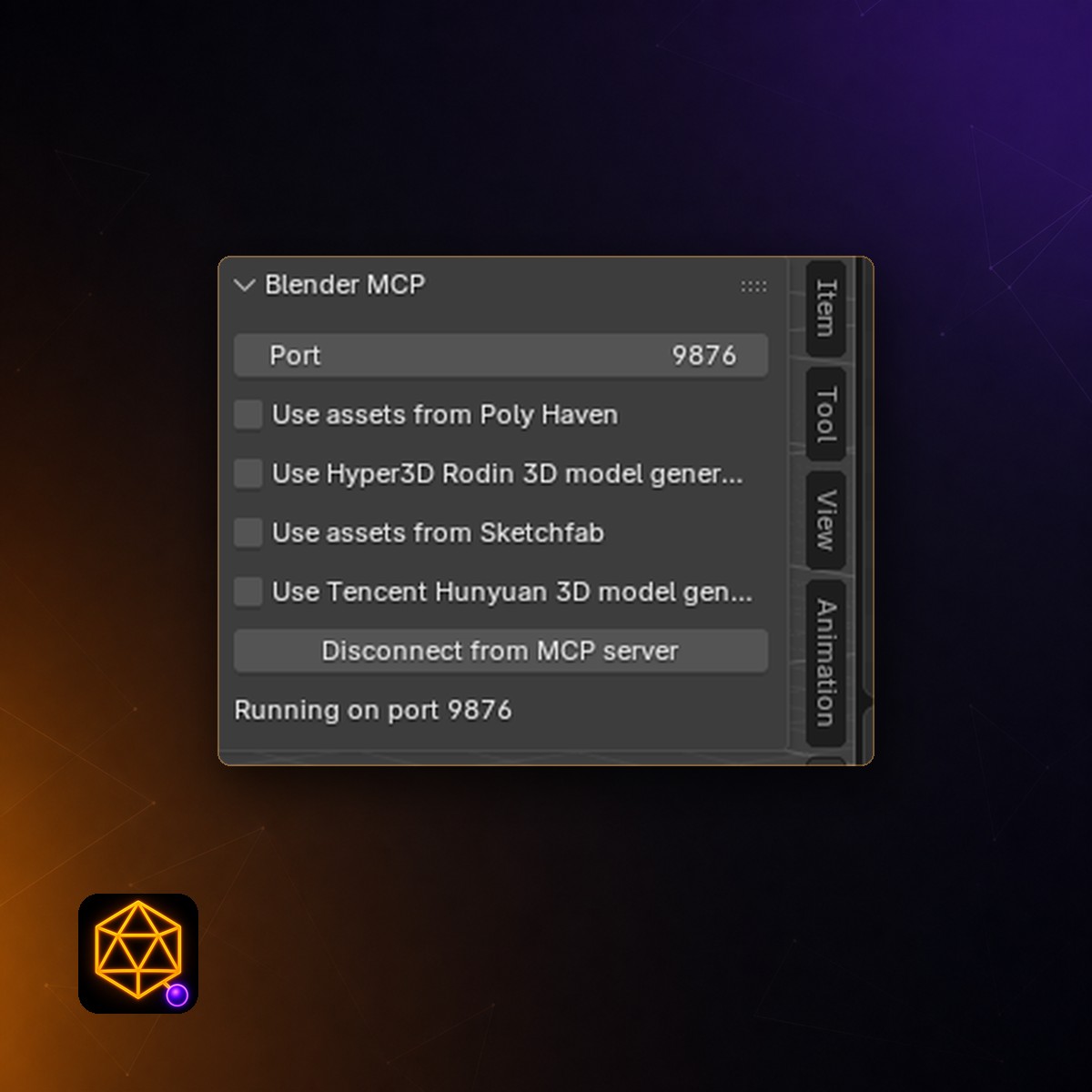
Blender MCP — One-Click Installer for Claude (Windows)
$19.00
Digital download — delivered instantly by email.
Instant delivery · non-refundable once delivered
Blender MCP lets you build 3D scenes by describing them to Claude. The catch has always been the setup.
This is that same integration, packaged so you never have to do any of it.
First, the thing most listings won't tell you. The Blender MCP add-on is free and open source, written by Siddharth Ahuja under the MIT licence. You can download it from GitHub right now and pay nothing.
What you are paying for here is the setup being done for you, and someone to email when it breaks. If you are comfortable installing a Python package manager and editing a JSON config file by hand, you do not need this. Go and enjoy the free version.
The setup, both ways
On your own
- Install
uvfrom a PowerShell command - Add
uvto your system PATH - Locate
claude_desktop_config.json - Hand-edit that JSON without breaking its syntax
- Download
addon.py, install it, enable it - Match the port number across two applications
- Work out which step failed when nothing connects
Five to ten minutes, and four places to get stuck
With this
- Double-click the installer
- Double-click the extension
- Click Connect in Blender
About two minutes. No Python, no config files.
Claude Desktop already ships everything the connector needs, which is what removes the first four of those chores outright.
What is Blender MCP?
MCP — the Model Context Protocol — is an open standard that lets an AI assistant use real software instead of only describing it. Blender MCP applies that to Blender: Claude can read your scene, run Blender's Python, add and modify objects, pull in free HDRIs and textures, and look at your viewport to check its own work.
In practice you describe what you want and watch it appear, then refine it in plain language — warmer light, camera lower, rougher glaze.
"Build a small still life: a wooden table with three ceramic bowls, lit from a window on the left. Then show me the viewport."
How to install Blender MCP on Windows
Written for someone who has never installed a Blender add-on. You need Blender and Claude Desktop, both free, installed first. Nothing else.
-
Unzip the download
Right-click the file you receive by email and choose Extract All. Extract the whole folder rather than opening files from inside the zip — that is the single most common thing that goes wrong.
-
Close Blender, then run the installer
Double-click INSTALL.bat. It finds every copy of Blender on your PC, installs the add-on and switches it on, telling you what it is doing in plain English as it goes.
Windows may show a blue "Windows protected your PC" box. Click More info, then Run anyway. That appears for any installer without a code-signing certificate — the file is plain text, so you can read exactly what it does in Notepad first.
-
Add the extension to Claude
Double-click the .mcpb file. Claude Desktop opens and asks you to confirm — click Install, then quit Claude Desktop completely and reopen it.
-
Connect from inside Blender
Open Blender, hover over the large 3D area and press N. A panel slides out on the right. Click the BlenderMCP tab, then Connect to Claude. Leave Blender open. This is one click each time you start a new session.
-
Check it worked
In Claude Desktop, type check the blender connection. Claude reports that it is connected and how many objects are in your scene. If something is wrong it names the step to fix rather than just failing — that check exists so you never have to guess.
What Claude can do in Blender
- Read your sceneObject names, types, positions, materials and mesh statistics, so its suggestions are about your actual file rather than a generic answer.
- Run Blender's PythonFull access to the same scripting API that add-ons use. Anything Blender can do, it can drive.
- See your viewportIt looks at your work and corrects itself. This build detects the blank-frame problem that intermittently affects Blender's screenshot and re-captures another way, so it keeps working where the standard setup quietly returns a black square.
- Pull in free assetsSearch, download and apply PolyHaven HDRIs, textures and models straight into your open scene. No account, no API key.
Ten recipes, built in
Setup gets you connected; these get you results. They appear in Claude's prompt menu — pick one, fill in the blanks, send. Each is written as direction rather than a fixed script, so it adapts to whatever you actually have open.
- Three-point lightingKey, fill and rim scaled to your subject rather than dropped at fixed coordinates. Soft, neutral or dramatic.
- Light with a free HDRISearches PolyHaven, downloads, and rotates the environment so the light actually flatters the subject.
- Frame the subjectCamera placement with a real focal-length decision behind it, and thirds composition instead of dead centre.
- Clay / form checkNeutral override so you can read shape without colour distracting you. Fully reversible.
- Studio scaffoldA seamless cyclorama backdrop sized to your scene — the biggest single difference between an amateur and a professional product render.
- Believable materialPhysically sensible metals and dielectrics, with roughness broken up so the surface stops reading as CG.
- Render settingsCycles or EEVEE dialled for a stated speed-versus-quality tradeoff, with an honest estimate of the time cost.
- Depth of fieldFocus object and f-stop chosen like a real lens, with a warning when your subject is too deep to hold focus.
- Clean up the sceneAudits unapplied scale, flipped normals, loose geometry and orphaned data — and tells you what was wrong before changing anything.
- TurntableOrbits the camera rather than the object, because rotating the object makes the lighting swim across the surface and gives it away instantly.
Built on open source, and we say so
This package includes the BlenderMCP add-on by Siddharth Ahuja under the MIT licence, which expressly permits redistribution and sale. The licence and full attribution ship inside the download, and an unmodified copy of the original sits alongside ours so the difference is auditable.
- We wrote the connectorThe original needs Python and a package manager; ours runs on what Claude Desktop already includes. It also queues requests one at a time — the add-on accepts a single connection, so parallel requests otherwise fail partway through a session.
- We removed a shared keyThe original ships a pooled free-trial key for a third-party model service. Reselling someone else's shared quota inside a paid product is not ours to do, so it is blank here. Everything else works without it.
Worth knowing, and we would rather you heard it here: the Blender Foundation now ships its own official MCP server, released as v1.0.0 on 27 April 2026. It is free, and if you want it, go and get it. Its emphasis is different from ours — Python API access and documentation search, aimed at understanding Blender rather than at art direction — and installing it means adding the Lab extension repository, which is straightforward when the index syncs and opaque when antivirus or a corporate network stops it.
The honest position: the connector underneath this product is the part with a free official alternative. The ten recipes are the part that doesn't — they are about lighting, framing and material craft, not about which server sits below them, so they apply just as well the day you switch. Buy this for the two-minute setup and the recipes, not because it is the only way in.
What you need
- WindowsThe installer is Windows-only. The extension itself is cross-platform and Mac and Linux users can install it by hand, but we do not support that path and would rather say so than take your money for it.
- Blender 3.0 or newerTested end to end against 3.4, 4.5 LTS and 5.1.
- Claude DesktopThe free tier works. A paid plan handles complex scenes better because it can take more turns before hitting a limit.
- In the downloadThe Claude extension, the installer and uninstaller, the add-on with its licence, a plain-English start guide, and a troubleshooting document ordered by how often each problem actually happens.
Common questions
Is Blender MCP free?
The underlying Blender MCP add-on is free and open source under the MIT licence, and we link the GitHub repository directly on this page. There is also a free official server from the Blender Foundation, released April 2026. What you are buying here is the packaged Windows installer, the recipe pack, and twelve months of support and updates — not the software itself.
Is this the official Blender MCP server?
No, and we will not pretend otherwise. The Blender Foundation released its own official MCP server as v1.0.0 on 27 April 2026, it is free, and we link it on this page. This package wraps the community add-on by Siddharth Ahuja instead, with a Windows installer and ten craft recipes on top. The difference in practice: the official server emphasises Python API access and documentation search — knowing Blender — while this one is set up for you in two minutes and comes with lighting, framing and material direction built in. The recipes are the part that survives whichever connector you end up running, because they are about craft rather than plumbing.
How do I install Blender MCP on Windows?
With this package: unzip the download, close Blender, double-click INSTALL.bat, then double-click the .mcpb file to add the extension to Claude Desktop. Open Blender, press N in the 3D viewport, choose the BlenderMCP tab and click Connect to Claude. It takes about two minutes and needs no Python and no configuration files.
Do I need to know Python to use Blender MCP?
No. You never have to see or write any code. Claude writes and runs the Blender Python for you, and you describe what you want in plain language.
Does Blender MCP work with ChatGPT or other AI tools?
This package targets Claude Desktop specifically, because that is what makes the zero-setup install possible. The underlying open-source project does support other MCP clients if you set it up yourself.
Can Claude delete my Blender work?
It can run any Blender command, which includes destructive ones. Save before long sessions. Blender's own undo usually catches mistakes, and File then Revert always will.
Does Blender MCP send my files anywhere?
Our connector opens a local connection on your own machine and does nothing else — no telemetry and no analytics. Your conversation with Claude goes to Anthropic, as it already does. The optional usage reporting in the original add-on is switched off in this build.
Which versions of Blender does it support?
Blender 3.0 and newer on Windows. This build has been tested end to end against Blender 3.4, 4.5 LTS and 5.1.
If it does not work, email us and we will fix it. That is the part a free download cannot give you, and it is most of what you are paying for. Support and updates are included for twelve months.
Already using Blender for geometry work? The 4D Polytope Engine is our Blender add-on for four-dimensional shapes.